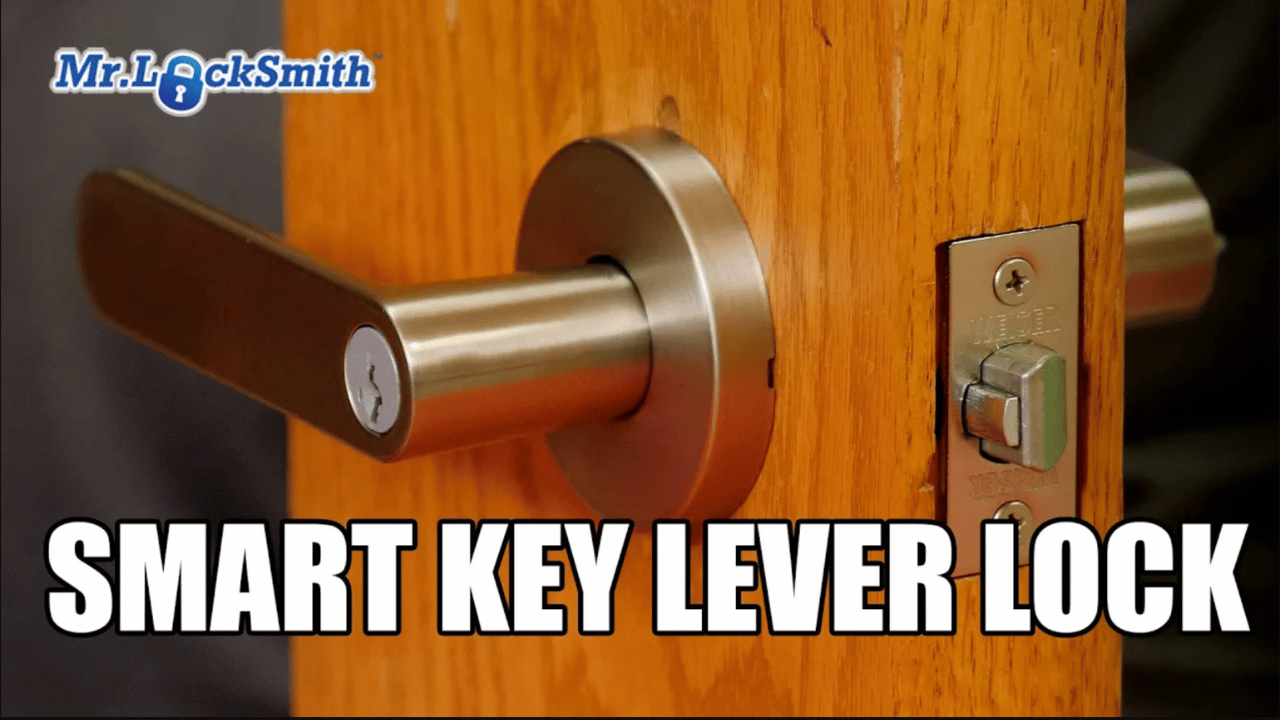
Master the Smart Key Lever Lock: Installation, Re-Keying, and Handing: Stop struggling with Smart Key Lever Entrance locks! Mr. Locksmith walks through the installation, re-keying, and handing of a Kwikset SmartKey lever lock, also sold under the Weiser SmartKey name and found across brands like Baldwin. This entrance-style SmartKey lever features a keyed exterior and thumb turn interior, making it a popular residential choice. Terry breaks down what’s in the box, explains the adjustable latch and backset (2-3/8” and 2-3/4”), and shows how to convert the faceplate to a drive-in latch when needed. (Source: Terry Whin-Yates)
Source: Mr. Locksmith Youtube http://www.youtube.com/user/24hrMrLocksmith
Master the Smart Key Lever Lock: Installation, Re-Keying, and Handing
Mr. Locksmith Automotive (604) 259-7617
Whether it’s branded as Kwikset, Weiser, or even Baldwin, the SmartKey system is everywhere. Today, we’re looking at the SmartKey Lever Lock entrance set. This is a classic setup with a key on the outside and a thumb turn on the inside.
While these are popular for their convenience, they can be a headache for locksmiths and DIYers alike if you don’t know how to handle the backset, the re-keying process, or the “handing” (making sure the lever isn’t upside down).
1. Adjusting the Backset Smart Key Lock
Before you even put the lock in the door, you have to ensure your latch matches the door’s preparation. The two most common backsets are 2-3/8″ and 2-3/4″.
-
How to adjust: Kwikset/Weiser latches are adjustable. Simply push down on the adjustment pin and slide the housing.
-
Pro Tip: If you’re struggling to get the latch to engage with the interior spindle during installation, push the latch bolt in slightly—it aligns the “half-moon” tailpiece and makes the handle slide on much easier.
2. How to Re-Key the SmartKey Lock
The beauty of the SmartKey system is that you don’t need a “Bible” or pins. You just need the current key and the SmartKey reset tool.
-
Insert the current key and turn it 90 degrees to the horizontal position.
-
Insert the Reset Tool into the small slot next to the keyway. You should feel a firm click (though sometimes it’s more of a feel than a sound).
-
Remove the Reset Tool (and the old key), then insert your new key.
-
Turn it back to vertical. Your lock is now re-keyed!
Warning: If you pull the key out while it’s in the horizontal position without finishing the process, you can “kill” the cylinder, requiring a specialized cradle to reset it.
3. The “Upside Down” Problem: Handing the Smart Key Lock
This is where the factory instructions usually fail. About 50% of the time, when you pull this lock out of the box and put it on an out-swinging door, the lever or the keyway will be upside down.
How to Hand the Lock Correctly:
-
The Tool: You need a 3/32″ Allen key.
-
Loosen the Set Screw: On the side of the lever, there is a small hole. Insert the Allen key and turn left to loosen. (Note: These are often very tight from the factory, so give it a good “crack” to break it loose).
-
Remove and Flip: Pull the lever handle off. You’ll see a clip holding the cylinder. Use a small flathead screwdriver to remove the cylinder, flip it 180 degrees, and slide it back in.
-
Re-attach: Slide the handle back on so it points the correct way for your door, tighten the set screw, and you’re back in business.
Why Professionals Care
Aside from the aesthetics of having a lock installed correctly, knowing the mechanics of the SmartKey lever is vital for security:
-
Anti-Shim: If installed correctly, the dead latch prevents “loiding” or slipping the lock with a credit card (though door play can often negate this).
-
Under the Door Tools: Unlike some commercial levers that have a “loose” handle when locked, the SmartKey lever is fixed. This means standard under-the-door bypass tools won’t work.
This comparison table is perfect for showing why the SmartKey system is a “love-it-or-hate-it” topic among locksmiths. While it offers unmatched convenience for the homeowner, traditional Pin-Tumbler locks remain the industry standard for durability and master-keying.
Comparison: SmartKey vs. Traditional Pin-Tumbler
| Feature | SmartKey (Wafer/Sidebar) | Traditional Pin-Tumbler |
| Re-Keying Method | DIY: Done in seconds with a reset tool and the current key. | Locksmith Required: Must be disassembled and internal pins replaced. |
| Bumping Resistance | High: Uses a sidebar/wafer design; essentially “bump-proof.” | Variable: Vulnerable to bumping unless high-security pins are used. |
| Pick Resistance | High: Very difficult to pick using traditional methods (requires decoding). | Low to Moderate: Standard pins are easy to pick; “spool” pins help. |
| Durability | Moderate: Complex internal parts (sliders/teeth) can fail or bend. | High: Simple, heavy-duty brass pins that can last decades. |
| Master Keying | Limited: Cannot be easily master-keyed for apartment complexes. | Excellent: Designed specifically for complex master-key systems. |
| Total Failure | “Self-Reset”: Slamming the door can occasionally cause it to “forget” the key. | Reliable: Mechanical failure is rare without physical damage. |
| Lockout Solution | Destructive: Often requires drilling or a specialized “cradle” tool. | Non-Destructive: Usually easy for a pro to pick or shim open. |
SmartKey Troubleshooting Checklist
If your SmartKey lever isn’t working correctly, run through these common failure points before reaching for the drill:
-
The “Lost” Key Position: Did you pull the key out mid-turn or while the reset tool was engaged?
-
The Fix: If the internal sliders are misaligned, the lock is “lost.” You will likely need a SmartKey Reset Cradle or a professional locksmith to reset the cylinder manually.
-
-
Key Won’t Enter All the Way: Are you using a “Weiser” key in a “Kwikset” branded lock (or vice versa)?
-
The Fix: While the internal technology is the same, the keyways (the shape of the hole) are different. Ensure your key blank matches the lock brand.
-
-
Reset Tool Doesn’t “Click”: Are you trying to reset the lock without the cylinder being in the exact horizontal position?
-
The Fix: The reset slot only aligns with the internal sidebar when the key is turned exactly 90 degrees. If it’s off by even a fraction, the tool won’t engage.
-
-
Lever is “Drooping” or Upside Down: Is the lever pointing the wrong way or sagging?
-
The Fix: This is a handing issue, not a mechanical failure. Use a 3/32″ Allen key to remove the lever, flip the cylinder, and re-seat the handle as shown in the video.
-
-
Key Turns but Latch Doesn’t Move: Is the “half-moon” tailpiece engaged?
-
The Fix: During installation, the spindle must align perfectly with the latch. If you forced it, the tailpiece might not be seated. Pull the handle off and check the alignment.
-
-
Lock is Binding: Does the key turn easily when the door is open, but struggles when the door is closed?
-
The Fix: This is a strike plate alignment issue. The dead-latch is likely hitting the edge of the strike plate, putting pressure on the sidebar. Adjust the plate on the door frame.
-
Pro Tip: The “Firm” Reset
Sometimes the internal wafers get “sticky” from dust or lack of use. If the reset tool isn’t going in, try a small spray of Teflon-based lubricant (never WD-40) into the keyway and the reset slot. Work the key back and forth a few times to loosen the sliders before trying the re-keying process again.
Source: Terry Whin-Yates Mr. Locksmith Linkedin
Want to See How to Bypass Smart Key Locks?
In my advanced training sessions, we go deep into how to bypass these locks, how to drill them efficiently, and the reality of trying to pick a slider-based system like SmartKey.
Ready to level up your skills? Visit my website to explore Online Locksmith Training for all levels—from beginners to advanced covert entry specialists.
ONLINE AUTOMOTIVE LOCKSMITH COURSE & WEBINAR
✅ Sign up here: https://mr-locksmith-training.thinkific.com/courses/automotive-locksmith-training
For Updated Locksmith Workshop Training Dates and Location go to https://mrlocksmith.com/locksmith-workshop-training-dates/
✅ Sign up here: https://mr-locksmith-training.thinkific.com/courses/locksmith-course-Become-a-Locksmith
Source: Terry Whin-Yates Mr. Locksmith Linkedin